> For the complete documentation index, see [llms.txt](https://docs.viction.xyz/llms.txt). Markdown versions of documentation pages are available by appending `.md` to page URLs; this page is available as [Markdown](https://docs.viction.xyz/viction-wallet/user-guide/general-settings.md).

# General settings

We have developed the “Wallet Settings” feature for users to change themes, change passwords, and change networks.

### How to change themes? <a href="#how-to-change-themes" id="how-to-change-themes"></a>

**Step 1:** On the home screen, click the **Discover tab**

**Step 2:** Click **General** then turn on the Dark Mode toggle to change the dark theme or turn off the Dark Mode toggle to change the light theme

<div><figure><img src="/files/whgXVisOLfysBacbZ5v6" alt=""><figcaption></figcaption></figure> <figure><img src="/files/ZqREaJ0ujrvCo3fEmWv0" alt=""><figcaption></figcaption></figure> <figure><img src="/files/LpacASjmEfqVXKzfYO8g" alt=""><figcaption></figcaption></figure></div>

### How to change password? <a href="#how-to-change-password" id="how-to-change-password"></a>

**Step 1:** On the home screen, click the **Discover tab**

**Step 2:** Click **Security & Privacy** then click **Change Password**

**Step 3**: Input your current password then click **Next**

<div><figure><img src="/files/vmLanSNUtlhWxx3MXsig" alt=""><figcaption></figcaption></figure> <figure><img src="/files/fmPWPc5NpnAwEUpfOXA4" alt=""><figcaption></figcaption></figure></div>

&#x20;

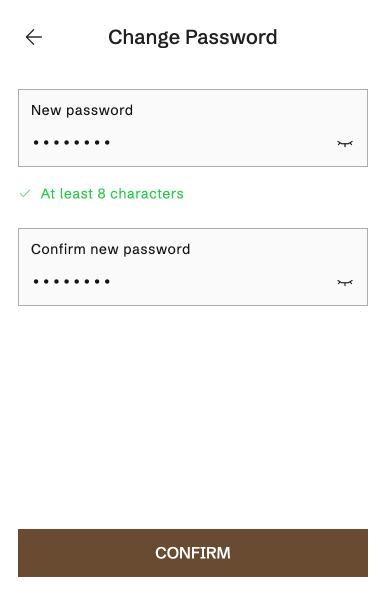
**Step 4:** Input new password and confirm new password then click **Confirm** to change new password

<figure><img src="/files/xyyAUFWA64aKjDc9C1vb" alt=""><figcaption></figcaption></figure>